Quickbooks Master Sync app iconQuickbooks Master Sync · Free on Frappe Cloud Marketplace

QuickBooks Online to ERPNext

Bring your QuickBooks books into ERPNext. Every balance intact.

Quickbooks Master Sync connects ERPNext to your QuickBooks Online company, brings your accounts, customers, suppliers, items, taxes and opening balances across, and shows you side by side that the numbers match.

QUICKBOOKS ONLINEERPNEXT
Chart of Accounts→Chart of Accounts
Customers→Customers
Vendors→Suppliers
Items and services→Items
Tax codes and rates→Sales Tax Templates
Terms→Payment Terms
Payment methods→Modes of Payment
Opening balances→Opening balances

Account types, root types and the account hierarchy are kept.

ERPNext v15 and v16Installs on current releases
MIT licensedOpen source and auditable
Built to reconcileBalances compared on both sides

Outgrowing the books

QuickBooks got you here. Growth is asking for more.

Most businesses start on QuickBooks for good reasons. It is quick to set up and every accountant knows it. The friction starts when the business grows around it: more people, more companies, stock to track, and a subscription that rises every summer.

QuickBooks Online does well

  • Bookkeeping for a single company
  • Invoices, bills and bank feeds
  • A familiar screen for accountants
  • Quick start for a new business
→

Where growing teams feel the limit

  • A user cap on every plan: 1, 3, 5 or 25
  • Inventory tracking only from the Plus plan
  • A separate subscription for each company and country
  • A list price that has risen every year since 2023

User caps and plan features: NerdWallet. One account per country: QuickBooks Community.

QuickBooks Online US list price, per month

2023, 2024, 2025 and August 2026, by plan

202320242025Aug 2026
$0$100$200$300$30$38Simple Start+27%$60$85Essentials+42%$90$140Plus+56%$200$340Advanced+70% 2023 to 2025: NerdWallet. 2026 amounts as published by reseller Fourlane; Intuit confirms the plans affected.

What a clean move needs

Getting names across is easy. Getting the books across is the work.

An export and a spreadsheet will copy lists. A clean first month in ERPNext needs four more things, and the app is built around each of them.

STRUCTURE01

The same chart of accounts

Two systems organise accounts differently. The app brings your QuickBooks chart across with its account types, root types and hierarchy intact, so reports read the way your accountant expects.

CONNECTION02

A connection that stays open

QuickBooks access tokens last one hour and the refresh token can change about every 24 hours. The app refreshes them for you, per company, so a long sync does not stop halfway.

Source: Intuit Developer
TRACEABILITY03

A record of every response

The QuickBooks API allows 500 requests a minute per company. The app works within that and stores every response it receives, so any record can be traced back to its source.

Source: Truto
PROOF04

Balances that match

Opening balances sync last, then the balance comparison shows every customer and supplier side by side. Differences surface before anyone files from them.

How the route evolved

The route from QuickBooks to ERPNext keeps getting easier.

The ERPNext community has built several ways across over the years. Each one made the move simpler. Ours adds automation and a check at the end.

2016

A community connector

Indictrans starts an open-source QuickBooks Online connector for ERPNext, backed by the community.

GitHub ↗
2018

Built into ERPNext

A QuickBooks Migrator is merged into ERPNext itself, bringing the connector into the core product.

PR #15718 ↗
2025

A standard import route

ERPNext's documentation sets out one standard path: Data Import, the Chart of Accounts Importer and the Opening Invoice Creation Tool.

Frappe docs ↗
2026

Automated, with proof

We publish Quickbooks Master Sync for ERPNext v15 and v16 on Frappe Cloud Marketplace.

Marketplace ↗

The standard route is to export from QuickBooks, clean and map the data, then load it with ERPNext's import tools and opening entries (Frappe docs). Our app automates that route end to end and adds a balance check once the data lands.

What we built

One app. Three jobs: connect, move, prove.

Quickbooks Master Sync runs inside ERPNext, so your finance team works in the system they are moving to, not in a separate migration tool.

Connect

Secure OAuth2 sign-in to QuickBooks Online from inside ERPNext. Tokens refresh automatically, and each company keeps its own credentials.

Move

Chart of accounts with its hierarchy, customers, suppliers, items, tax templates, payment terms, payment methods and opening balances, with live progress on every step.

Prove

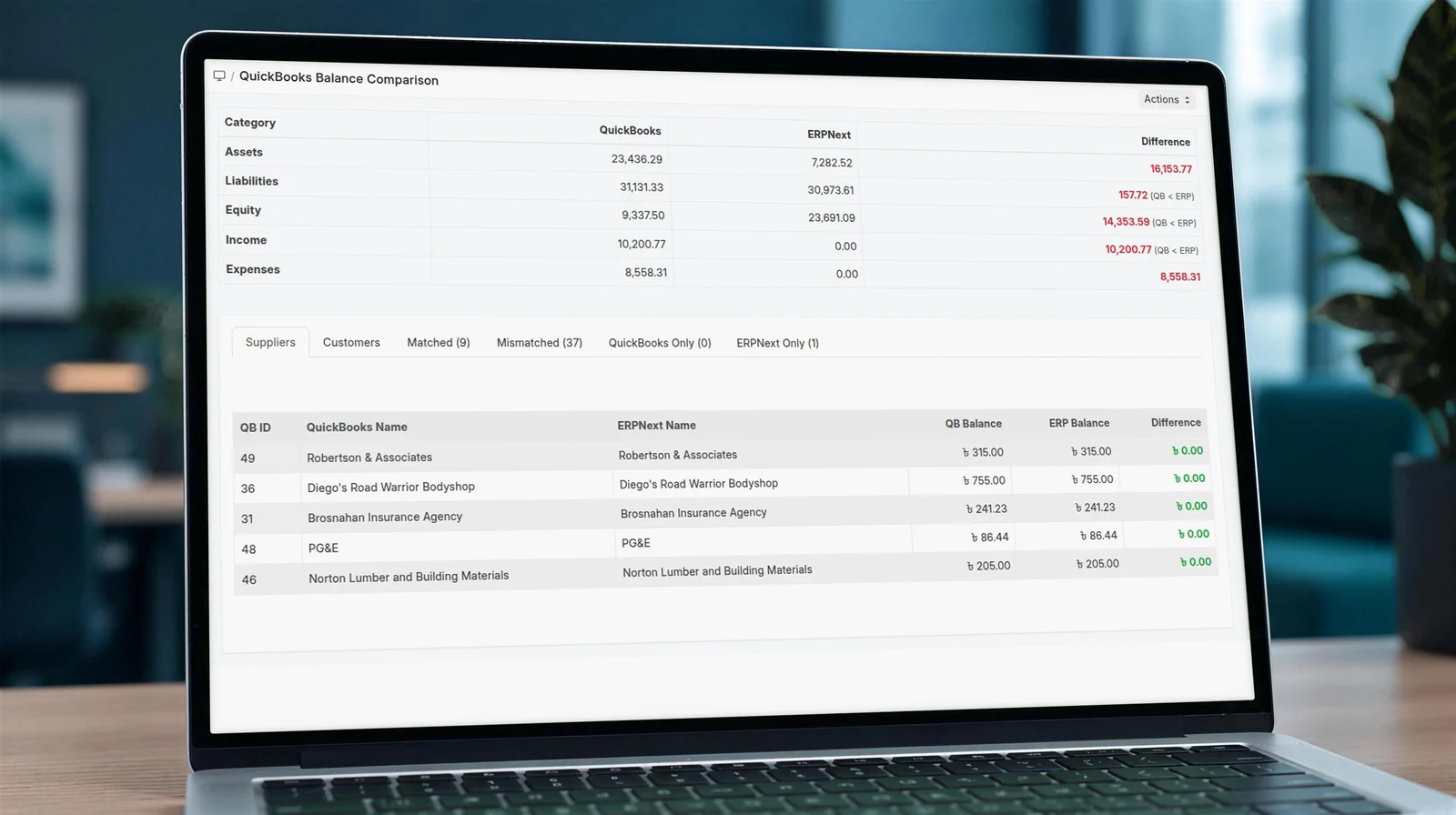
Balances compared side by side: matched, mismatched, in QuickBooks only, in ERPNext only. Differences surface before anyone files from them.

Laptop showing the QuickBooks Balance Comparison screen in ERPNext with QuickBooks and ERPNext balances side by side

Balance comparison

Totals by category at the top, then every customer and supplier with its QuickBooks balance, its ERPNext balance and the difference. Tabs split them into matched, mismatched, QuickBooks only and ERPNext only.

Shown on QuickBooks sandbox data.

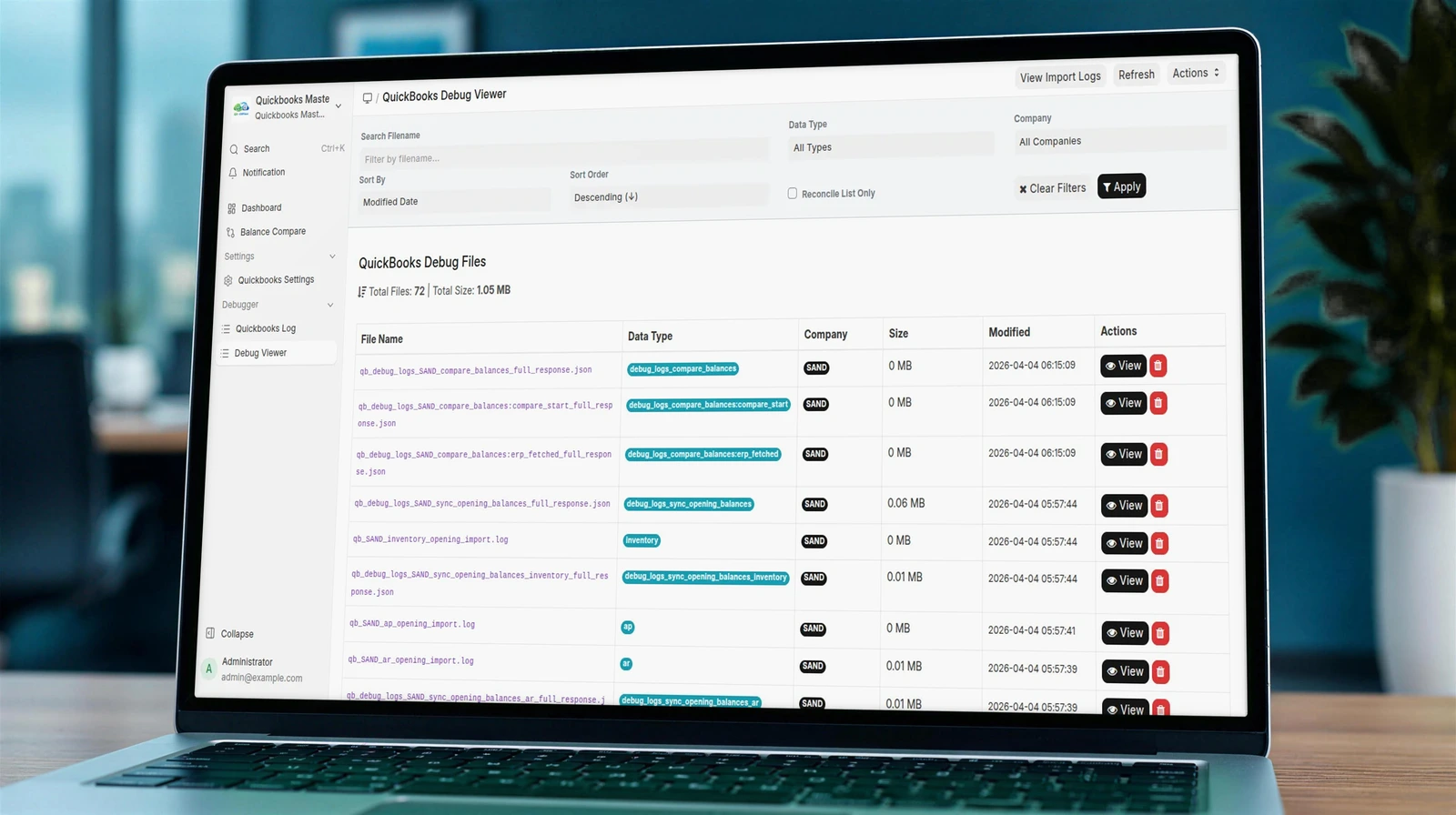
Laptop showing the QuickBooks Debug Viewer in ERPNext listing each stored API response with its data type, company and date

Debug viewer

Every response QuickBooks sends is stored with its data type, company and time, so any record in ERPNext can be traced back to what QuickBooks returned.

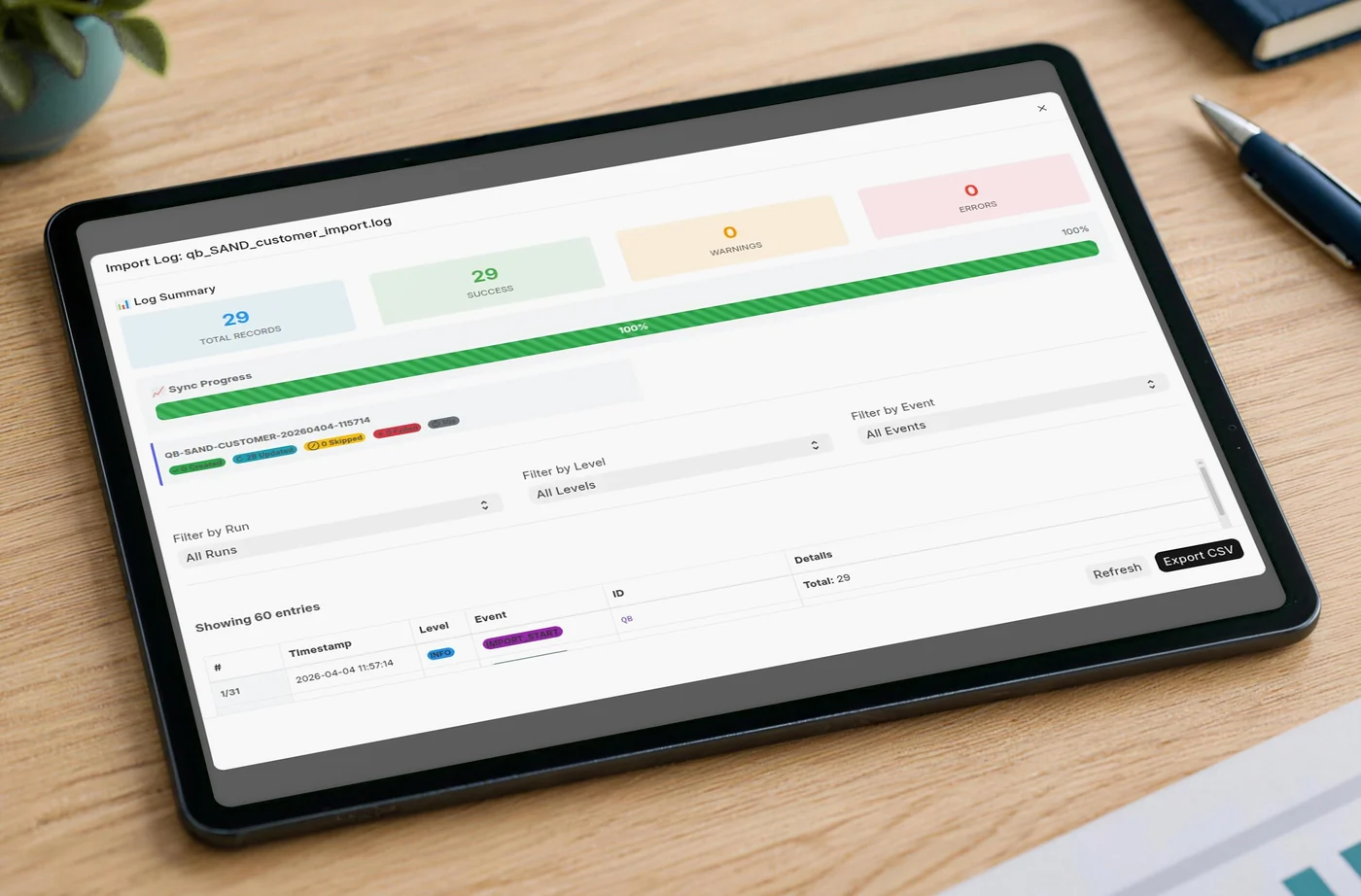
Tablet showing the QuickBooks to ERPNext import log: 29 records, 29 imported, 0 warnings, 0 errors

An import log for every run

Each sync records what arrived, what was updated and what was skipped, with a clear count at the top.

Shown on QuickBooks sandbox data.

What the app saves you

The same move, without the spreadsheets.

Step
By hand
With Quickbooks Master Sync
Getting the data out
Export a file for every list
Direct, secure connection to QuickBooks Online
Chart of accounts
Rebuild the tree and import it
Synced with types, root types and hierarchy
Customers and suppliers
Clean and map columns into templates
Synced with contacts, addresses and tax details
Taxes
Recreate every rate by hand
Tax codes and rates become Sales Tax Templates
Opening balances
Keyed into a journal entry
Synced at the end of the run
Checking the result
Two reports and a spreadsheet
Side-by-side balance comparison

Features as listed on Frappe Cloud Marketplace.

Setup

Connected in five steps.

No export files and no import templates. The app talks to QuickBooks Online directly through Intuit's official API.

Install the app

Add Quickbooks Master Sync to your ERPNext v15 or v16 site from Frappe Cloud Marketplace.

Add your keys

Enter the Client ID and Client Secret from your Intuit developer app in QuickBooks Settings.

Connect QuickBooks

Sign in and approve access through QuickBooks' own OAuth2 screen.

Choose the company

Pick the ERPNext company the QuickBooks books should land in.

Sync, then compare

Run the sync, watch each step finish, then check the balance comparison.

Proven on real books

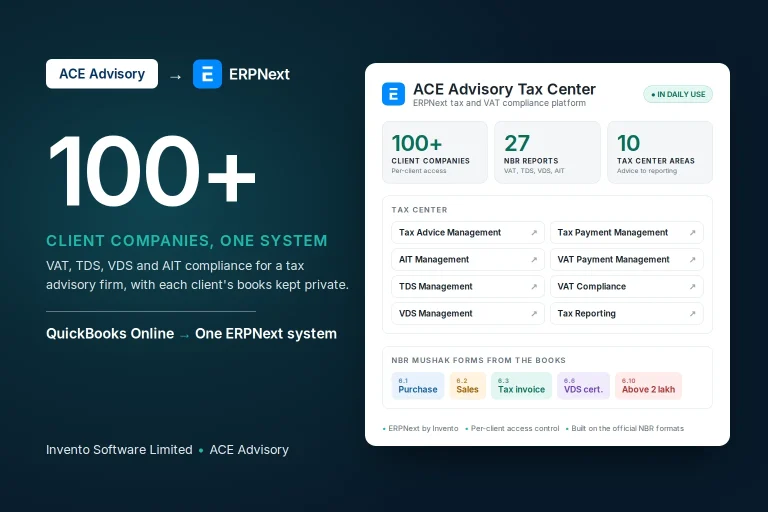
First built for a firm with 100+ client companies.

ACE Advisory, a tax and corporate advisory firm in Bangladesh, kept the accounts for more than 100 client companies on QuickBooks Online. We moved them into one ERPNext system, and the connector behind this app was rebuilt for that move.

100+client companies
12record types moved
1ERPNext system
Read the ACE Advisory story →
  • Secure sign-in and many companies managed from one place
  • Tax codes mapped company by company, with checks
  • Balances compared in QuickBooks and ERPNext before go-live
  • A migration run can be undone and run again
  • Accounting logic tested against real figures

Available now

Start free. Upgrade when history matters.

The free app moves your master data and opening balances. Teams that need their invoice, bill and payment history in ERPNext can move it with the full version.

Quickbooks Master Sync

Connect QuickBooks Online to ERPNext, move your master data and opening balances, and compare balances on both sides.

FreeERPNext v15ERPNext v16MIT licence
What you need
  • An ERPNext v15 or v16 site
  • Your QuickBooks Online company
  • A Client ID and Secret from an Intuit developer app
Feature
Free
Full
Chart of accounts, customers, suppliers, items
✓
✓
Tax templates, payment terms, payment methods
✓
✓
Opening balances
✓
✓
Customer and supplier balance comparison
✓
✓
Account balance comparison
No
✓
Invoices, bills and payments
No
✓
Journal entries
No
✓
The full version is available from Invento. Ask us about your migration.

QuickBooks Desktop? The app works with QuickBooks Online through Intuit's API. Desktop company files need a different route, which we can plan with you.

Common questions

QuickBooks to ERPNext, answered.

What finance teams ask us before they move.

Is there a QuickBooks migration tool for ERPNext?

Yes. Quickbooks Master Sync is a free app for ERPNext v15 and v16 on Frappe Cloud Marketplace. It connects to QuickBooks Online and brings your master data and opening balances into ERPNext, then compares balances on both sides.

Can I move from QuickBooks Online to ERPNext automatically?

Yes. The app signs in to QuickBooks Online with OAuth2 and syncs your chart of accounts, customers, suppliers, items, tax rates, payment terms, payment methods and opening balances into the ERPNext company you choose.

Can I bring my invoice and payment history?

The full version syncs transactions, meaning invoices, bills and payments, as well as journal entries. Many teams instead bring opening balances at a cut-over date and keep QuickBooks read-only for older history. We help you decide which fits.

How do I know the numbers match after the move?

The balance comparison screen lists every customer and supplier with its QuickBooks balance, its ERPNext balance and the difference, grouped into matched, mismatched, QuickBooks only and ERPNext only. The full version adds account-level comparison.

How are QuickBooks tax codes handled?

QuickBooks tax codes and tax rates become ERPNext Sales Tax Templates, including tax groups, so tax is calculated the same way on new documents.

Does it support more than one company?

Yes. Each ERPNext company can hold its own QuickBooks credentials, so a group or an accounting firm can connect several QuickBooks companies to one ERPNext system.

Does it work with QuickBooks Desktop?

No. The app uses the QuickBooks Online API. QuickBooks Desktop files need a different migration route.

What does it cost?

The app is free on Frappe Cloud Marketplace under the MIT licence. The full version with transaction sync is available from Invento. ERPNext itself is open source, and hosting on Frappe Cloud starts at $5 a month.

Planning a move from QuickBooks Online?

We have implemented ERPNext since 2015, including moving an accounting firm's 100+ client companies from QuickBooks Online into ERPNext. Tell us how your books are set up and we will plan the cut-over with you.

Talk to us about your migration →Or install the free app and start today.