Managing human resources and payroll across expanding organizations requires complete operational synchronization between workforce activities and financial ledgers. As companies scale, calculating compensation in standalone spreadsheets or isolated software inevitably creates reconciliation errors, delayed salary disbursements, and compliance liabilities with tax authorities.
Direct Answer: How ERPNext HR & Payroll Integrates with Accounting
ERPNext HR and Payroll (Frappe HR) unifies employee attendance, shift schedules, and dynamic salary structures into a single database. When monthly attendance is finalized, submitting a Payroll Entry automatically generates verified Salary Slips and books an automated Journal Entry in the General Ledger (GL)—instantly debiting departmental salary expense accounts and crediting payroll liabilities, tax withholdings (TDS), and provident funds without manual data entry.
Built upon the robust Frappe open-source framework, the ERPNext platform provides an enterprise-grade, end-to-end Human Resource Management System (HRMS). Unlike standalone HR software that requires cumbersome CSV exports and manual journal vouchers, Frappe HR natively synchronizes with Accounts Payable, General Ledger, Project Cost Centers, and Asset Management.
Whether you are deploying ERPNext for an enterprise corporate headquarters, a fast-growing retail chain, or a high-volume manufacturing plant with thousands of biometric punch clocks, this comprehensive architectural manual explains every module, configuration path, accounting journal entry, and local statutory rule required for a seamless deployment. If you are currently evaluating how ERPNext compares with other platforms in the region, consult our companion evaluation on the best HR and payroll software in Bangladesh.
1. Modern Frappe HR Architecture (v14 & v15 Evolution)
In earlier versions of ERPNext, Human Resources was packaged as a monolithic core module inside the main ERP application. Starting with Version 14 and refined in Version 15, Frappe officially decoupled HR into a dedicated, open-source application known as Frappe HR (frappe/hrms). This modern modular architecture provides critical architectural advantages for enterprise organizations:
- Independent Release & Upgrade Cycles: Organizations can upgrade their HRMS, install compliance patches, or deploy employee portal enhancements without risking regression in core financial, sales, or manufacturing ledgers.
- Dedicated Mobile Progressive Web App (PWA): Employees and line managers access an ultra-responsive PWA tailored for smartphones. Staff can clock in via geo-fencing, review real-time leave balances, submit expense receipts directly from phone cameras, and download encrypted PDF payslips.
- Direct Hardware API Integration: The Frappe REST API enables seamless biometric synchronization with local biometric attendance machines (such as ZKTeco, Hikvision, and Suprema devices) without requiring proprietary middleware subscriptions.
- Unified Single-Database Schema: Despite running as a distinct app, Frappe HR shares the identical MariaDB/PostgreSQL database and Python backend with ERPNext, eliminating the fragile webhooks and API sync latency common with third-party software.
2. The 6 Core Modules of Frappe HR: Architectural Blueprint
The Frappe HR ecosystem is structured around six interconnected operational pillars, ensuring complete lifecycle management from initial talent acquisition to retirement or full-and-final settlement:
| HR Module | Primary Frappe DocTypes | Core Automations | Business Impact |
|---|---|---|---|
| 1. Employee Lifecycle | Employee, Job Applicant, Job Opening, Employee Onboarding, Employee Promotion, Employee Separation |
Automated task allocation for IT/Admin onboarding, auto-generated digital employee records, full-and-final gratuity settlement workflows. | Single source of truth; zero paperwork lost during hiring, role changes, and departures. |
| 2. Shifts & Attendance | Shift Type, Shift Assignment, Shift Request, Employee Checkin, Attendance, Attendance Request |
Auto-sync with biometric time clocks, automatic attendance marking via cron, late entry and early exit thresholds, half-day wage deductions. | Eliminates buddy punching and manual attendance disputes across multi-shift operations. |
| 3. Leave & Holidays | Leave Type, Leave Allocation, Leave Application, Leave Policy, Holiday List, Leave Encashment |
Automated monthly/annual leave accrual, compensatory off allocation on weekend work, earned leave encashment calculations linked to basic wage. | Enforces statutory leave compliance while providing real-time leave ledger visibility to managers. |
| 4. Payroll & Tax | Salary Component, Salary Structure, Salary Structure Assignment, Payroll Entry, Salary Slip |
Formula-based salary components, automated progressive tax slabs, batch salary slip processing, direct GL journal voucher generation. | Cuts monthly payroll processing from 5 days to 30 minutes with guaranteed mathematical accuracy. |
| 5. Expense Claims | Expense Claim, Employee Advance, Expense Claim Type, Travel Request |
Mobile receipt upload, multi-tier manager approval chains, automated deduction of advances, direct reimbursement via payroll or accounts payable. | Prevents unauthorized operational spending and eliminates lost paper receipts. |
| 6. Performance (PMS) | Appraisal Template, Appraisal, Appraisal Cycle, KRA, Goal, Energy Point Rule |
Goal tracking against Key Result Areas (KRAs), automated 360-degree feedback requests, performance score weighting tied to salary increments. | Transforms annual subjective reviews into continuous, objective, merit-based compensation growth. |
3. Biometric Attendance Integration & Shift Management
One of the most persistent bottlenecks in workforce operations is synchronizing physical biometric time clocks with payroll calculations. When attendance data must be manually extracted via USB drives or proprietary software, errors in overtime and unpaid absences multiply.
The Automated Biometric Data Pipeline
In a production Frappe HR deployment, physical time clocks communicate directly with the server via an automated integration pipeline:
- Device Punch Capture: Employees swipe their fingerprint, RFID card, or facial scan on hardware terminals (e.g., ZKTeco, Hikvision). The terminal logs the transaction with an Employee ID, timestamp, and device location ID.
- API Middleware Synchronization: An open-source Python daemon (or biometric API listener) queries the local network terminals every 60 seconds and pushes the raw punches to the Frappe REST endpoint:
/api/resource/Employee Checkin. - Shift Auto-Assignment & Mapping: The Frappe HR background scheduler maps each
Employee Checkinrecord against the employee’s activeShift Type. The system evaluates whether the punch represents anINorOUTgesture based on shift start and end windows. - Automated Attendance Generation: A nightly automated cron job processes all check-in entries against configured shift rules. It marks the employee as Present, Absent, Half Day (if working hours fall below the minimum threshold), or Late (if arrival exceeds the grace period).
Because every calculated attendance day directly influences the Payment Days parameter in monthly payroll, line managers can review and resolve attendance disputes in real time throughout the month rather than during the high-pressure payroll closing week.
4. Deep-Dive: ERPNext Payroll Integration with Accounting & General Ledger
The primary reason enterprise CFOs and financial controllers choose ERPNext over standalone HR solutions is its seamless integration with the financial chart of accounts. In ERPNext, payroll is not an external cost report; it is an automated, double-entry financial posting mechanism that preserves complete auditable ledger integrity.
The End-to-End Payroll to General Ledger Workflow
The automated salary processing cycle follows an exact 5-step financial sequence:
Step 1: Salary Structure Assignment (Defines employee basic, allowances & deductions)
↓
Step 2: Payroll Entry (Select Company, Branch, Department, Fiscal Month & Cost Center)
↓
Step 3: Bulk Salary Slip Generation (Calculates gross, net, taxes & attendance deductions)
↓
Step 4: Review & Verification (Audit draft slips against payroll summary variance reports)
↓
Step 5: Submission & Automated Journal Voucher (Books GL entries & generates bank file)
Master General Ledger (GL) Posting Chart
When a Payroll Entry is submitted, ERPNext generates an automated Journal Entry that credits liabilities and debits operational expenses according to each component’s configured account mapping:
| GL Account | Account Type | Entry Type | Financial Description |
|---|---|---|---|
| Salaries & Wages Expense | Expense (P&L) | DEBIT | Total gross earnings (Basic pay, House Rent, Medical, Conveyance allowances). |
| Overtime Expense | Expense (P&L) | DEBIT | Statutory overtime premium calculated from approved extra hours. |
| Employer Provident Fund Contribution | Expense (P&L) | DEBIT | Company matching contribution to the employee retirement trust fund. |
| Payroll Payable / Salary Payable | Current Liability (Balance Sheet) | CREDIT | Net take-home pay owed to employees on disbursement date. |
| Income Tax (TDS) Payable | Current Liability (Balance Sheet) | CREDIT | Tax withheld at source for deposit into government treasury via challan. |
| Provident Fund Trust Payable | Current Liability (Balance Sheet) | CREDIT | Combined employee deduction + employer matching share payable to PF trust. |
| Employee Advance / Loan Recovery | Current Asset (Balance Sheet) | CREDIT | Reduces outstanding balance of previously disbursed employee loans or advances. |
Bank Disbursement & Payment Settlement Entry
Once the payroll journal entry is booked, the finance department clicks Make Bank Entry within the Payroll Entry document. ERPNext generates a secondary settlement transaction:
- DEBIT:
Payroll Payable / Salary Payable(Clears the liability to zero). - CREDIT:
Bank Current Account(Reflects actual electronic cash outflow via BEFTN/NPSB).
For organizations operating manufacturing plants with shop-floor job cards and labor routing (as detailed in our manufacturing ERP guide), ERPNext allows you to tag specific Cost Centers or Project Codes on each employee or salary slip line item. This ensures that direct factory labor is accurately absorbed into work-in-progress inventory, while administrative staff salaries are routed to general overheads. To learn more about setting up initial accounting defaults, consult our ERPNext setup guide.
5. Bangladesh Statutory Compliance Engine (BLA 2006 & NBR)
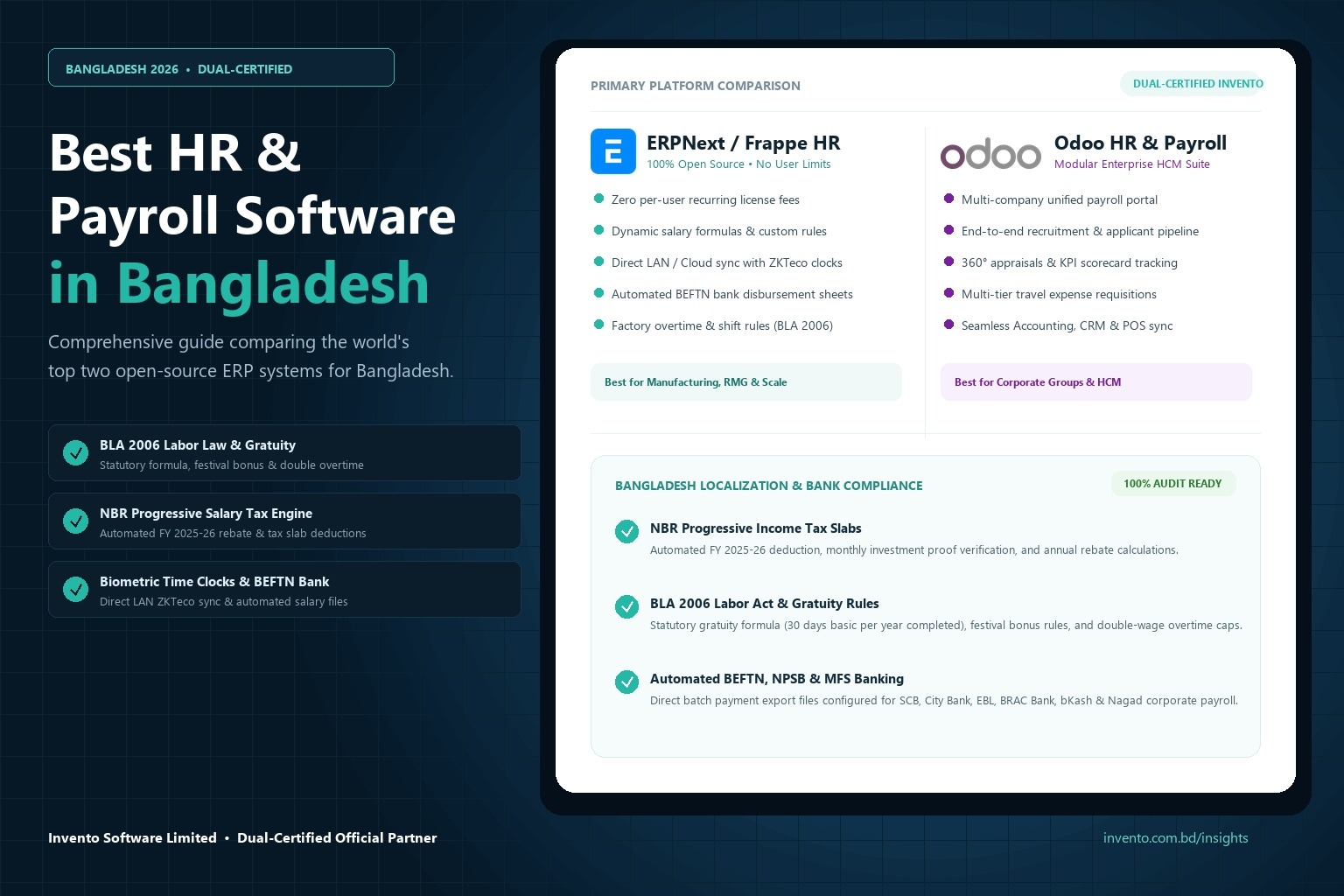
Implementing HRMS in Bangladesh requires strict adherence to statutory labor codes and National Board of Revenue (NBR) regulations. Generic global software frequently fails because it cannot calculate progressive income tax slabs or enforce mandatory overtime formulas. In ERPNext, these statutory requirements are automated directly within the salary engine:
A. Overtime Calculation under Bangladesh Labor Act (BLA 2006)
Under the Bangladesh Labor Act 2006 (Section 108), overtime for industrial and commercial workers must be compensated at double the ordinary basic hourly wage. For factory environments with a standard 8-hour workday (26 working days = 208 working hours per month), the formula configured inside the Frappe Salary Component is:
Frappe HR automatically pulls ot_hours directly from the approved Attendance records, eliminating manual calculation and preventing over-billing.
B. Mandatory Festival Bonuses
Permanent employees in Bangladesh are entitled to two festival bonuses per year (typically distributed during Eid-ul-Fitr, Eid-ul-Adha, or Durga Puja). In ERPNext, this is configured as an earning component governed by a condition formula:
Amount: base * 1.0
C. NBR FY 2025-26 Progressive Salary Tax Slabs (TDS)
Under the Income Tax Act 2023 and the FY 2025-26 Finance Bill, individual employee income tax is deducted at source each month based on annual projected earnings. Frappe HR automates progressive tax brackets:
- Zero-Tax Threshold: First ৳3,50,000 of annual taxable income (৳4,00,000 for female employees and senior citizens aged 65+).
- Next ৳1,00,000: 5%
- Next ৳4,00,000: 10%
- Next ৳5,00,000: 15%
- Next ৳5,00,000: 20%
- Remaining Balance: 25%
- Minimum Tax Floor: ৳5,000 for employees residing in Dhaka and Chittagong City Corporation zones.
ERPNext recalculates monthly tax withholding dynamically based on investment rebate submissions, ensuring full compliance with NBR withholding tax return submissions. For an overview of how ERPNext handles wider fiscal regulations, see our guide on Bangladesh VAT compliance and NBR registers.
D. Statutory Gratuity Accrual Calculations
According to BLA 2006, employees completing continuous service of more than five years are entitled to statutory gratuity upon separation:
- 5 to 10 Years Tenure: 30 days of last-drawn basic wage for each completed year of service.
- Above 10 Years Tenure: 45 days of last-drawn basic wage for each completed year of service.
When an employee separation entry is initiated, Frappe HR calculates the total payable gratuity based on verified date of joining and last drawn basic salary, generating an automated settlement journal voucher.
E. Electronic Bank & MFS Payout Integration
Manual bank transfers are prone to human error and consume days of administrative effort. ERPNext generates pre-formatted payment disbursement files configured for Bangladesh commercial banking portals:
- BEFTN & NPSB Batch Files: Formatted for corporate net-banking portals including Standard Chartered Bank (Straight2Bank), The City Bank (CityLive), Eastern Bank Limited (EBL Connect), and BRAC Bank (CorpNet).
- Corporate Mobile Financial Services (MFS): Formatted batch payout files for bulk bKash and Nagad corporate payroll disbursement, ideal for factory floor workers and field personnel.
6. Enterprise HR & Payroll Implementation Checklist
To guarantee a successful, disruption-free deployment of ERPNext HR & Payroll, follow this battle-tested 8-step implementation sequence:
- Standardize Salary Structures: Define clear component percentages (e.g., Basic 50%, House Rent 30%, Medical 10%, Conveyance 10%) before importing employee data.
- Verify Biometric Punch Data: Test hardware API listeners across all branch locations to ensure zero lost punch transactions during network outages.
- Configure Multi-Entity Chart of Accounts: Ensure each branch and legal entity has designated payroll expense and liability accounts assigned in Frappe Company masters.
- Map Approval Matrices: Establish multi-tier leave and expense authorization workflows based on Department and Reporting Manager hierarchies.
- Run Parallel Payroll Cycles: Execute at least two consecutive monthly payroll cycles simultaneously in ERPNext and your legacy system/spreadsheets. Reconcile variances down to the exact paisa before full cutover.
- Publish Shift Grace Periods: Document and configure clear grace periods for late check-in and early exit to prevent employee dissatisfaction.
- Distribute PWA Mobile Credentials: Train employees on clocking in, applying for leave, and accessing encrypted payslips via their smartphones.
- Automate Statutory Monthly Reporting: Set up automated scheduled reports for monthly salary tax deduction registers and employee provident fund contributions.
Accelerate Your HR & Payroll Transformation with Invento
As an official Frappe and ERPNext implementation partner in Bangladesh, Invento Software Limited specializes in architecting localized HRMS and payroll solutions. From seamless biometric device integration and automated BLA 2006 compliance to general ledger synchronization and BEFTN batch banking, our senior engineers deliver reliable, scalable workforce automation.