
VAT return guide for ERPNext users
Follow one finance officer through her month-end. Five calm checks turn the numbers in ERPNext into a VAT return she can trust, now that NBR checks returns online.
 Bangladesh VAT Compliance app
 NBR eVAT portal
It is the week the VAT return is due, and Nusrat has a spreadsheet open that she does not quite trust.
Returns went in on paper. A small slip could sit quietly in a form for months.
Since 20 September 2026NBR made online returns compulsory for 11 sectors, and cement is one. The eVAT portal checks numbers as they arrive.
So Nusrat does what careful students do before an exam. She checks her work, one step at a time.
The idea in one picture
Think of VAT as two jars.
Every time the company sells cement, the customer pays VAT on top of the price. That money does not belong to the company. It goes into the first jar: VAT collected.
Every time the company buys raw materials or services from a registered supplier, it pays VAT too. That goes into the second jar: VAT paid.
At the end of each tax period, the company works out the difference. If the first jar holds more, the extra goes to the government. If the second jar holds more, the extra is carried forward to the next period.
A VAT return is simply the form that shows this sum, with a few extra lines for special cases. In Bangladesh that form is called Mushak 9.1. Some traders and commercial importers now use a separate form, Mushak 9.1.1, added by the Finance Act 2026. Nusrat's company makes cement, so hers is Mushak 9.1.
What changed in 2026
On paper, a return was just a form. Online, it is a set of numbers that a system can compare with other numbers: what suppliers say they sold, what customers say they deducted, what reached the treasury.
NBR's General Order 12/Mushak/2026 names the 11 sectors that must now file online:
A business in one of these sectors files its whole return online, not only the part about that product.
Being late now costs real money. A late or missing return carries a fine of Tk 2,000 under the VAT Act, and unpaid VAT gathers interest of 1% a month.
One thing is still changing. The Finance Act 2026 made returns quarterly by default from July 2026, and in late September the Cabinet approved a move back to monthly returns. Until that change becomes law, this guide simply says "each tax period". The steps are the same either way.
Nusrat starts with sales, because that is the first jar.
Invento's free VAT app builds the sales register, called Mushak 6.2, straight from the company's sales invoices. Every invoice appears with the customer, the amount and the VAT. She checks three things.
The register's VAT total matches the VAT account in the books.
Mushak 6.3 invoice numbers run in order, with cancelled ones explained.
A sale that came back is not counted a second time.
First, the VAT. The register works out VAT from each item's tax rate, while the books hold the VAT that was actually charged. If someone changed the tax on an invoice by hand, or an item was set up without the right tax template, the two numbers drift apart. This month she finds one: a new product was set up with the wrong tax template, so the register and the books disagree by a few thousand taka. She fixes the template and the totals line up. Finding that gap today is far easier than explaining it later.
Second, the invoice numbers. A missing number can look like a sale that was never reported. Where an invoice was cancelled, she makes sure a note explains why. Shops that sell over the counter face the same check, which is why a POS system that prints Mushak 6.3 at the till helps.
Third, sales that came back. When a customer returns cement, ERPNext records the return against the original invoice, and it shows up in the register as a minus line. Nusrat makes sure each return is counted once only, so it does not appear again as a separate adjustment later in the return.
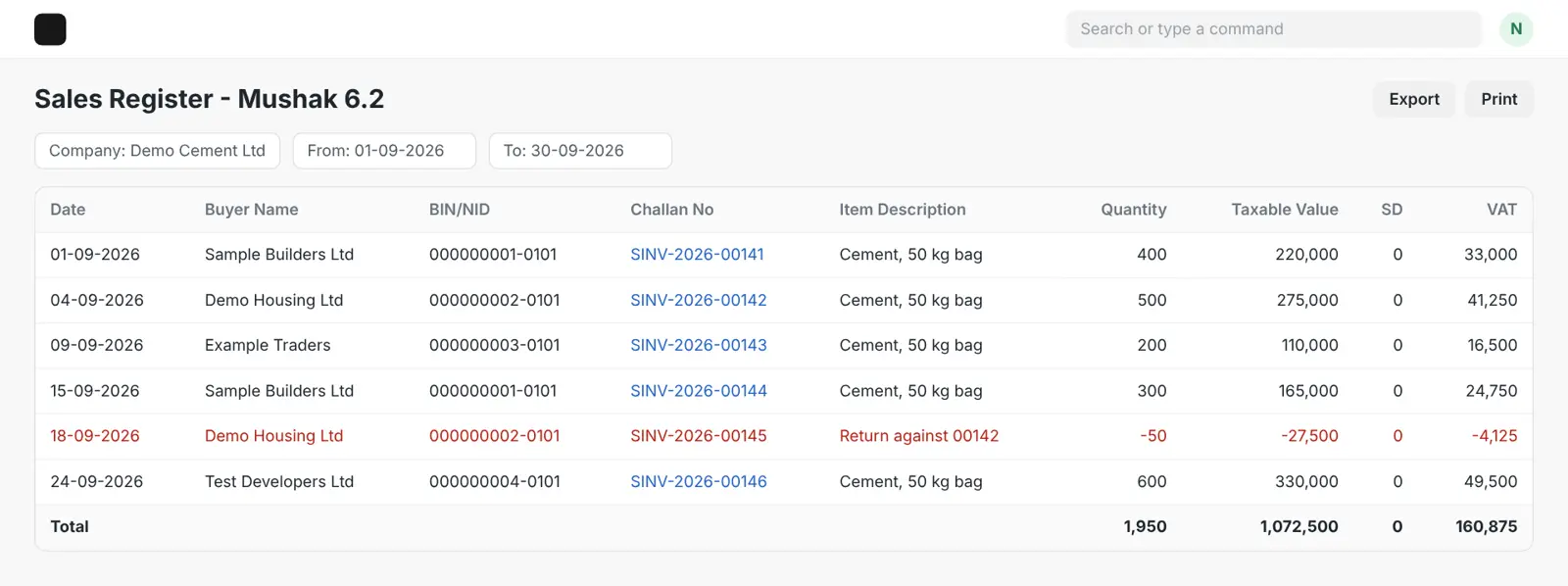
The sales VAT in the register matches the books, the invoice numbers have no gaps, and every return is counted once.
Next comes the second jar: the VAT the company paid on its purchases. Taking this off the bill is called claiming input tax credit. It is also where tax officers look most closely, so Nusrat treats every claim as something she may one day have to prove.
The VAT Act sets three simple rules for a purchase to count:
Some purchases never count, whatever the paperwork says. Passenger cars and entertainment are two common examples.
The app helps with the first rule. Its Supplier Mushak 6.3 report lists each purchase and shows whether the supplier's invoice has been collected. When a supplier's Mushak 6.3 arrives, the team uploads it, and the status changes from Not Collected to Collected.
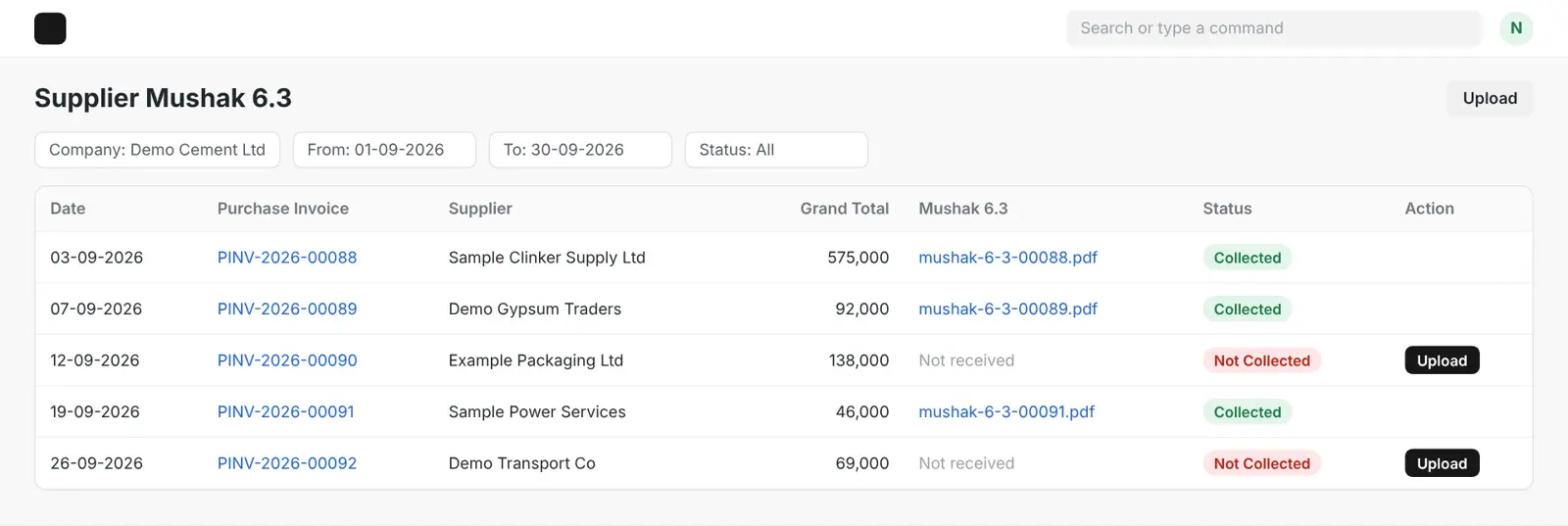
Nusrat filters for Not Collected. Two suppliers still owe her their invoices. She leaves those two purchases out of this period's claim and sends a reminder. She has not lost anything: if the invoices arrive within six tax periods, she can claim them then.
Every claimed purchase has its Mushak 6.3, purchases over Tk 1 lakh were paid by bank, and nothing is older than six tax periods.
This step confuses many people, so here it is in plain words.
Some large buyers, such as banks, government offices and limited companies, must keep back part of the VAT when they pay a supplier, and pay it to the government themselves. This is called VDS, short for VAT deducted at source. The buyer then gives the supplier a certificate, Mushak 6.6, as proof.
Nusrat's company stands on both sides of this.
It sometimes keeps back VAT from its own suppliers. That money is owed to the government, so it adds to the return. The app's VDS Management report lists each deduction and shows whether it has been deposited yet.
Big customers sometimes keep back VAT from it. That VAT was already paid on the company's behalf, so it lowers the return, but only if the company holds the customer's Mushak 6.6.
The app's Sales VAT Management report makes the second case easy to see. Each customer payment is marked as collected, as deducted with the certificate received, or as deducted with the certificate still missing.
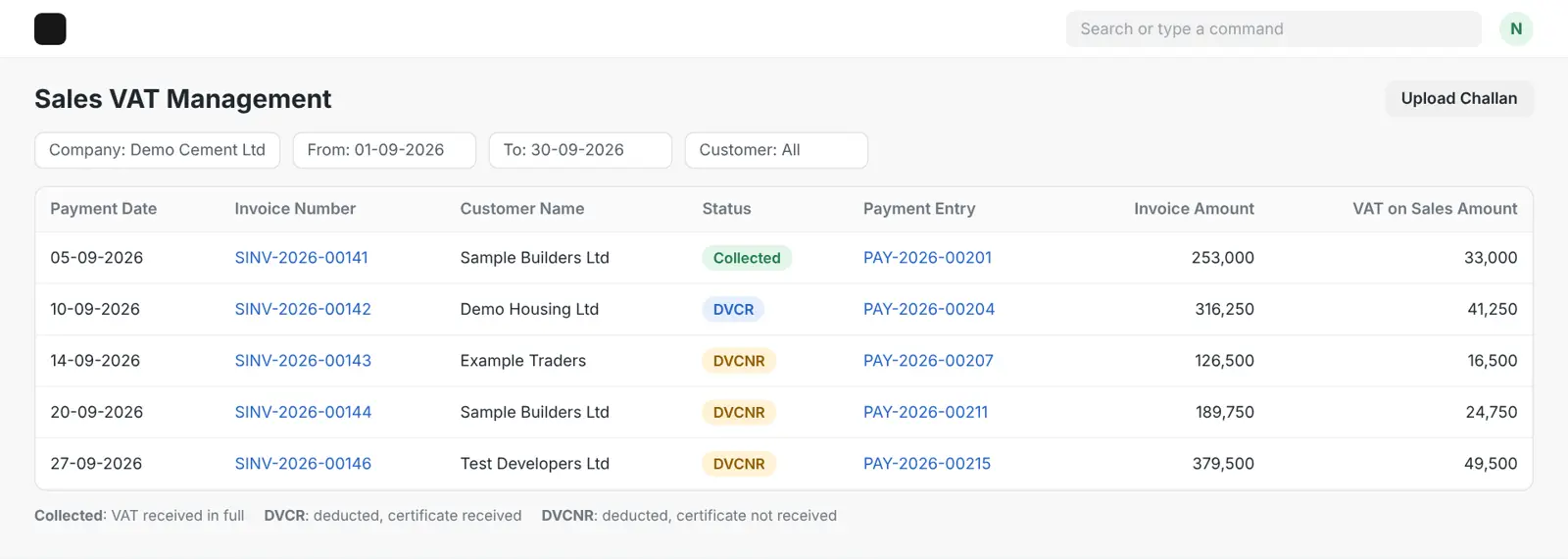
Nusrat finds three customer payments where VAT was kept back but no certificate has arrived. She does not count them yet, and she emails the customers today. Once the certificates come, she has up to six tax periods to adjust them.
VAT kept back from suppliers is listed and deposited, and VAT kept back by customers is counted only where the Mushak 6.6 is in hand.
With both jars checked, Nusrat knows what the company owes.
The app's VAT Payment page lists the VAT still waiting to go to the government, from sales and from VDS kept back from suppliers. When the deposit is made, the page creates the journal entry in ERPNext, and the team attaches the treasury challan to it. The challan number and date are needed in the return, so keeping the challan next to the entry saves a search later. Nusrat also checks that the amount deposited matches what the return says is owed.
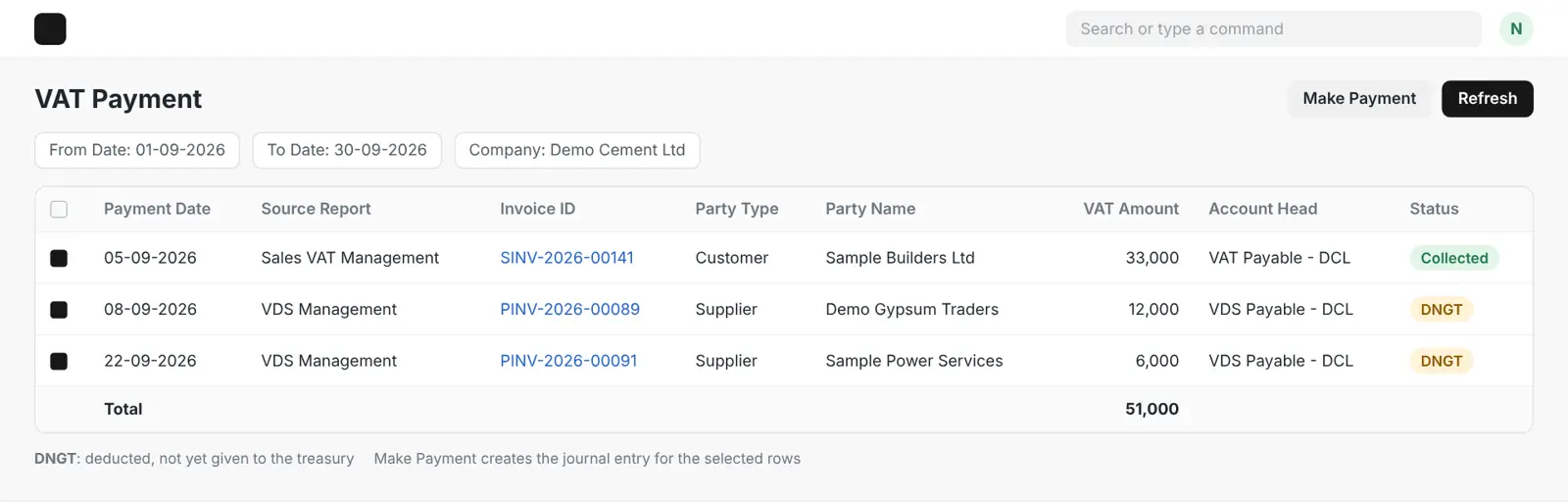
Then she looks back before she moves on. Every return starts with the closing balance from the last one. If last period ended with extra VAT paid, that amount carries into this period. She opens last period's return and copies the figure exactly.
A word of warning for businesses that used to file on paper. NBR asked them to enter their old paper returns into the eVAT system by 30 June 2026. According to the Financial Express, businesses that missed it had their closing balances as of May 2026 frozen, and cannot claim refunds until all past returns are in the system. If a carried-forward balance looks stuck, this is the first thing to check.
The treasury payment is made and its challan saved, and last period's closing balance is carried in exactly.
Now Nusrat signs in to the eVAT portal, vat.gov.bd and opens Mushak 9.1.
There is no public link yet that sends a return from ERPNext straight to NBR, so the totals are typed in by hand. This is where the earlier steps pay off. Each box on the form already has a checked number waiting for it.
One part needs a little care. The return asks for sales and purchases split by type: exports, exempt goods, standard-rate goods and so on. Nusrat makes the split by sorting her registers by tax template. If each tax template is set up to match one type, the split takes minutes instead of hours.
She reviews the draft on screen, submits it and saves the acknowledgement.
Then she does one last thing that many teams forget. In ERPNext's Accounts Settings, she sets the Accounts Frozen Till Date to the last day of the period she has just filed. From now on, nobody can quietly change an invoice in a period that NBR has already seen. How ERPNext closes a period is worth reading if your team has never done this.
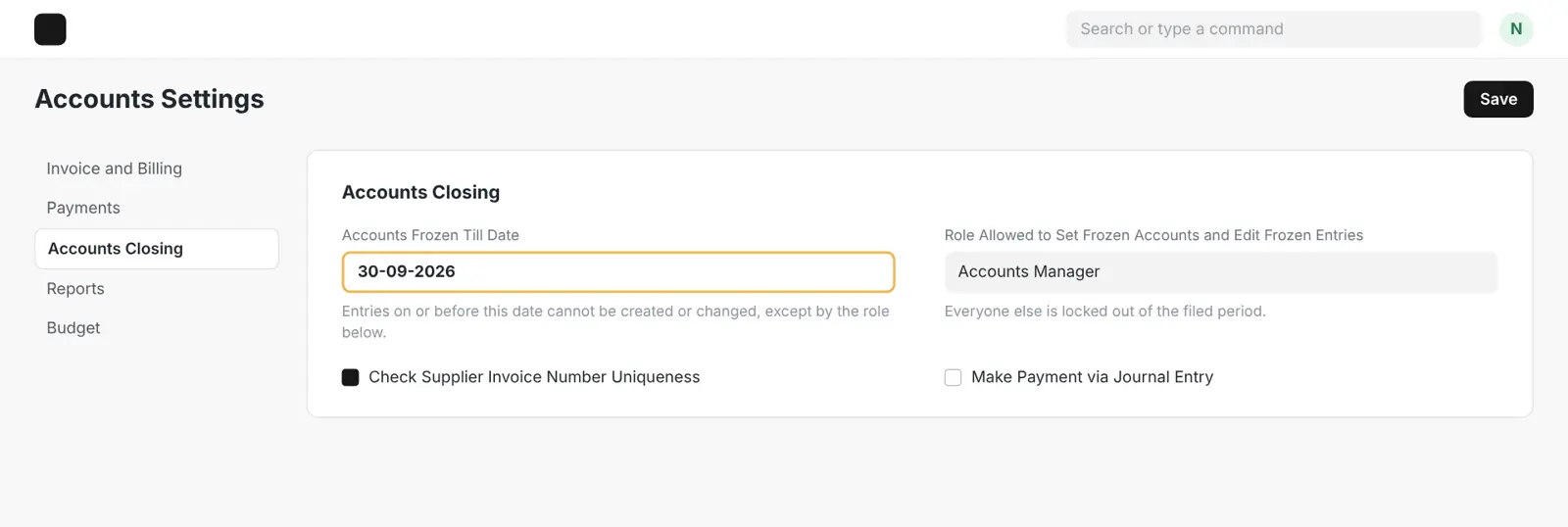
Every total typed into the portal matches a checked report, and the filed period is frozen in ERPNext.
Behind every step
Nusrat did not build any of these reports herself. They come with the free Bangladesh VAT Compliance app for ERPNext, which runs on the same invoices, payments and stock her team already records.
About 2,600 installs
Free on the Frappe Cloud Marketplace, for ERPNext versions 15 and 16
ACE Advisory, a tax firm that keeps the books for more than 100 companies, runs its VAT and tax work on an ERPNext system Invento built around its own practice.
The end of the month
Mushak 9.1
Return filed
Nothing about the work was clever. Nusrat checked each jar before she added them up, in the same order every time.
Customers now send their Mushak 6.6 on time.
The register and the books agree from the first invoice.
Same five steps, same order, every period. Each round is quicker than the last.
An ERP is not a magic button. It is one place where every number comes from the same entries, so checking them becomes a routine instead of a scramble.
See how Invento sets up ERPNext in Bangladesh
Keep this
Twelve quick checks, grouped by step. Tap each one as you finish it.
0 of 12 checked
Questions finance teams ask
Since 20 September 2026, businesses in the 11 sectors named in NBR's General Order 12/Mushak/2026 must file through the eVAT portal: cigarettes, mobile phones, mild steel products, medicine, beverages, cement, tiles, paint and varnish, insurance, banking and non-bank financial services, and mobile financial services. NBR has said more sectors may be added later.
The Finance Act 2026 made quarterly returns the default from July 2026, with monthly returns allowed by choice. In September 2026 the Cabinet approved a change back to monthly returns, due within 15 days after each period ends. Until that change is published as law, check NBR's latest notice before you file.
Mushak 9.1 is the standard VAT return. The Finance Act 2026 added Mushak 9.1.1 for some traders and commercial importers, such as traders who do not claim input tax credit. If you are not sure which one applies to you, ask your VAT adviser.
Not today. ERPNext with Invento's free app keeps the registers, invoices and certificates the return is built from, but there is no public connection that sends a return from ERPNext to NBR. The totals are entered on vat.gov.bd.
A late or missing return carries a fine of Tk 2,000 under section 85 of the VAT Act, and unpaid VAT gathers interest of 1% a month, for up to 24 months. Older figures of Tk 5,000 or Tk 10,000 still appear online, but they are out of date.
Only if the purchase is Tk 1 lakh or less. For anything above Tk 1 lakh, the VAT Act allows input tax credit only when the payment went through a bank or mobile banking. Either way, you also need the supplier's Mushak 6.3.
Invento's ERPNext team can look over your tax templates, registers and month-end steps, and show you where the numbers might drift apart before NBR sees them.
Book a free consultation  The Daily Star
 PwC on the Finance Act 2026
 The Financial Express